Sharing your creative work with the world can be an exciting and rewarding experience. It can also mean a bunch of legal things you didn’t know you had to worry about. Thankfully, with this guide you don’t have to start from scratch. (Before you dig in, be sure to read our disclaimer.)
Glad you asked! When you make a creative work (such as writing, graphics, or code), that work is under exclusive copyright by default. That is, the law assumes that as the author of your work, you have a say in what others can do with it.
In general, that means nobody else can use, copy, distribute, or modify your work without being at risk of take-downs, shake-downs, or litigation.
Open source is an unusual circumstance, however, because the author expects that others will use, modify, and share the work. But because the legal default is still exclusive copyright, you need to explicitly give these permissions with a license.
These rules also apply when someone contributes to your project. Without a license or other agreement in place, any contributions are exclusively owned by their authors. That means nobody – not even you – can use, copy, distribute, or modify their contributions.
Finally, your project may have dependencies with license requirements that you weren’t aware of. Your project’s community, or your employer’s policies, may also require your project to use specific open source licenses. We’ll cover these situations below.
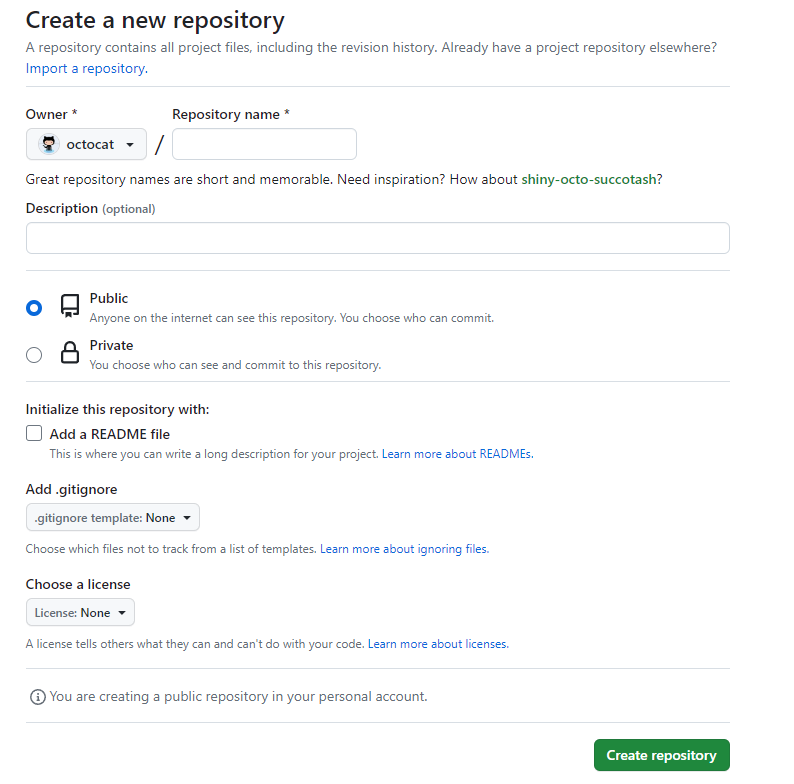
When you create a new project on GitHub, you have the option to make the repository private or public.
Making your GitHub project public is not the same as licensing your project. Public projects are covered by GitHub’s Terms of Service, which allows others to view and fork your project, but your work otherwise comes with no permissions.
If you want others to use, distribute, modify, or contribute back to your project, you need to include an open source license. For example, someone cannot legally use any part of your GitHub project in their code, even if it’s public, unless you explicitly give them the right to do so.
You’re in luck, because today, open source licenses are standardized and easy to use. You can copy-paste an existing license directly into your project.
MIT, Apache 2.0, and GPLv3 are popular open source licenses, but there are other options to choose from. You can find the full text of these licenses, and instructions on how to use them, on choosealicense.com.
When you create a new project on GitHub, you’ll be asked to add a license.
It’s hard to go wrong with the MIT License if you’re starting with a blank slate. It’s short, easily understood, and allows anyone to do anything so long as they keep a copy of the license, including your copyright notice. You’ll be able to release the project under a different license if you ever need to.
Otherwise, picking the right open source license for your project depends on your objectives.
Your project very likely has (or will have) dependencies, each of which will have its own open source license with terms you have to respect. For example, if you’re open sourcing a Node.js project, you’ll probably use libraries from the Node Package Manager (npm).
Dependencies with permissive licenses like MIT, Apache 2.0, ISC, and BSD allow you to license your project however you want.
Dependencies with copyleft licenses require closer attention. Including any library with a “strong” copyleft license like the GPLv2, GPLv3, or AGPLv3 requires you to choose an identical or compatible license for your project. Libraries with a “limited” or “weak” copyleft license like the MPL 2.0 and LGPL can be included in projects with any license, provided you follow the additional rules they specify.
Dependencies with source-available licenses, such as the Business Source License BSL or the Server Side Public License SSPL, may appear to be under open source licenses but come with usage and business model restrictions. These restrictions may prevent your project from being considered Open Source as defined by the Open Source Initiative (OSI).
Projects often rely on non-source code content, such as images, icons, videos, fonts, data files, or other materials, which are governed by their own licenses. As with traditional software dependencies, the licenses these materials range from Commercial to permissive to Copyleft. The Creative Commons, a non-profit organization, created a series of licenses popular for non-source content. Creative Commons licenses range from very permissive CC0 to Permissive CC-BY to copyleft CC-SA. They also can sometimes restrict commercial use by adding a non-commercial (NC) option to these licenses. You may also want to consider the communities you hope will use and contribute to your project:
Your company may have policies for open source project licensing. Some companies require your projects to bear a permissive license to permit integration with the company’s proprietary products. Other policies enforce a strong copyleft license and an additional contributor agreement (see below) so only your company can use the project in closed source software. Organizations may also have certain standards, social responsibility goals, or transparency needs which could require a particular licensing strategy. Talk to your company’s legal department for guidance.
When you create a new project on GitHub, you are given the option to select a license. Including one of the licenses mentioned above will make your GitHub project open source. If you’d like to see other options, check out choosealicense.com to find the right license for your project, even if it isn’t software.
Most projects never need to change licenses. But occasionally circumstances change.
For example, as your project grows it adds dependencies or users, or your company changes strategies, any of which could require or want a different license. Also, if you neglected to license your project from the start, adding a license is effectively the same as changing licenses. There are three fundamental things to consider when adding or changing your project’s license:
It’s complicated. Determining license compatibility and compliance and who holds copyright can get complicated and confusing very quickly. Switching to a new but compatible license for new releases and contributions is different from relicensing all existing contributions. Involve your legal team at the first hint of any desire to change licenses. Even if you have or can obtain permission from your project’s copyright holders for a license change, consider the impact of the change on your project’s other users and contributors. Think of a license change as a “governance event” for your project that will more likely go smoothly with clear communications and consultation with your project’s stakeholders. All the more reason to choose and use an appropriate license for your project from its inception!
Your project’s existing license. If your project’s existing license is compatible with the license you want to change to, you could just start using the new license. That’s because if license A is compatible with license B, you’ll comply with the terms of A while complying with the terms of B (but not necessarily vice versa). So if you’re currently using a permissive license (e.g., MIT), you could change to a license with more conditions, so long as you retain a copy of the MIT license and any associated copyright notices (i.e., continue to comply with the MIT license’s minimal conditions). But if your current license is not permissive (e.g., copyleft, or you don’t have a license) and you aren’t the sole copyright holder, you couldn’t just change your project’s license to MIT. Essentially, with a permissive license the project’s copyright holders have given permission in advance to change licenses.
Your project’s existing copyright holders. If you’re the sole contributor to your project then either you or your company is the project’s sole copyright holder. You can add or change to whatever license you or your company wants to. Otherwise there may be other copyright holders that you need agreement from in order to change licenses. Who are they? People who have commits in your project is a good place to start. But in some cases copyright will be held by those people’s employers. In some cases people will have only made minimal contributions, but there’s no hard and fast rule that contributions under some number of lines of code are not subject to copyright. What to do? It depends. For a relatively small and young project, it may be feasible to get all existing contributors to agree to a license change in an issue or pull request. For large and long-lived projects, you may have to seek out many contributors and even their heirs. Mozilla took years (2001-2006) to relicense Firefox, Thunderbird, and related software.
Alternatively, you can have contributors pre-approve certain license changes via an additional contributor agreement (see below). This shifts the complexity of changing licenses a bit. You’ll need more help from your lawyers up front, and you’ll still want to clearly communicate with your project’s stakeholders when executing a license change.
Probably not. For the vast majority of open source projects, an open source license implicitly serves as both the inbound (from contributors) and outbound (to other contributors and users) license. If your project is on GitHub, the GitHub Terms of Service make “inbound=outbound” the explicit default.
An additional contributor agreement – often called a Contributor License Agreement (CLA) – can create administrative work for project maintainers. How much work an agreement adds depends on the project and implementation. A simple agreement might require that contributors confirm, with a click, that they have the rights necessary to contribute under the project open source license. A more complicated agreement might require legal review and sign-off from contributors’ employers.
Also, by adding “paperwork” that some believe is unnecessary, hard to understand, or unfair (when the agreement recipient gets more rights than contributors or the public do via the project’s open source license), an additional contributor agreement may be perceived as unfriendly to the project’s community.
Some situations where you may want to consider an additional contributor agreement for your project include:
If you do need to use an additional contributor agreement with your project, consider using an integration such as CLA assistant to minimize contributor distraction.
If you’re releasing an open source project as a company employee, first, your legal team should know that you’re open sourcing a project.
For better or worse, consider letting them know even if it’s a personal project. You probably have an “employee IP agreement” with your company that gives them some control of your projects, especially if they are at all related to the company’s business or you use any company resources to develop the project. Your company should easily give you permission, and maybe already has through an employee-friendly IP agreement or a company policy. If not, you can negotiate (for example, explain that your project serves the company’s professional learning and development objectives for you), or avoid working on your project until you find a better company.
If you’re open sourcing a project for your company, then definitely let them know. Your legal team probably already has policies for what open source license (and maybe additional contributor agreement) to use based on the company’s business requirements and expertise around ensuring your project complies with the licenses of its dependencies. If not, you and they are in luck! Your legal team should be eager to work with you to figure this stuff out. Some things to think about:
Third party material: Does your project have dependencies created by others or otherwise include or use others’ code? If these are open source, you’ll need to comply with the materials’ open source licenses. That starts with choosing a license that works with the third party open source licenses (see above). If your project modifies or distributes third party open source material, then your legal team will also want to know that you’re meeting other conditions of the third party open source licenses such as retaining copyright notices. If your project uses others’ code that doesn’t have an open source license, you’ll probably have to ask the third party maintainers to add an open source license, and if you can’t get one, stop using their code in your project.
Trade secrets: Consider whether there is anything in the project that the company does not want to make available to the general public. If so, you could open source the rest of your project, after extracting the material you want to keep private.
Patents: Is your company applying for a patent of which open sourcing your project would constitute public disclosure? Sadly, you might be asked to wait (or maybe the company will reconsider the wisdom of the application). If you’re expecting contributions to your project from employees of companies with large patent portfolios, your legal team may want you to use a license with an express patent grant from contributors (such as Apache 2.0 or GPLv3), or an additional contributor agreement (see above).
Trademarks: Double check that your project’s name does not conflict with any existing trademarks. If you use your own company trademarks in the project, check that it does not cause any conflicts. FOSSmarks is a practical guide to understanding trademarks in the context of free and open source projects.
Privacy: Does your project collect data on users? “Phone home” to company servers? Your legal team can help you comply with company policies and external regulations.
AI: As AI models and functionality become integral to software, it is crucial to understand licensing agreements and relevant legislation controlling their use. Even when a model or service claims to be under a standard open source license, additional terms may impose restrictions, such as preventing abuse or fraud. New legislation is also putting restrictions on the types of systems or actions that can be performed by AI-based software.
Software Bill of Materials: A Software Bill of Materials (SBOM) is a comprehensive list of third-party dependencies, versions, associated licenses, and other metadata. SBOMs are legally mandated in certain countries, industries, or due to contractual obligations. A request for a SBOM often starts the license compliance journey for an organization.
If you’re releasing your company’s first open source project, the above is more than enough to get through (but don’t worry, most projects shouldn’t raise any major concerns).
Longer term, your legal team can do more to help the company get more from its involvement in open source, and stay safe: